

Microsoft Teams Rooms vs Zoom Rooms: a comparison guide
Selecting the right meeting room system is crucial for modern hybrid workspaces. Both Microsoft Teams Rooms (MTR) and Zoom Rooms dominate the corporate hardware landscape, transforming meeting spaces into high-definition, one-touch collaboration hubs. However, key differences exist in licensing, platform ecosystems, AI integration, and management overhead.
This guide breaks down how both platforms perform across core enterprise pillars to help IT leaders and facilities managers standardise their audio-visual (AV) infrastructure.
Key Differences Breakdown
1. Ecosystem and User Experience
Microsoft Teams Rooms: Built natively for organisations living inside Microsoft 365. Meetings flow straight into persistent team chats, shared OneDrive files, and Outlook calendars.
Zoom Rooms: Focuses purely on an effortless, low-friction video experience. It integrates smoothly across mixed tech stacks, whether your company uses Google Workspace, Microsoft 365, or alternative productivity suites.
2. AI Companion vs Copilot
Zoom AI Companion: Included out of the box with paid room plans. It delivers real-time meeting summaries, action-item tracking, and smart gallery views without extra licensing fees.
Microsoft Copilot for Teams Rooms: Requires additional licensing alignments. However, it unlocks multi-modal intelligence across the entire Microsoft graph—pulling context directly from emails, documents, and chat histories.
3. Licensing Models and Predictability
Microsoft Teams Rooms: Offers a basic tier for smaller setups (capped at 25 devices) alongside a Pro tier required for enterprise features, dual screens, and full management.
Zoom Rooms: Features a simple, flat-rate pricing model that includes scheduling displays, whiteboards, and AI capabilities without requiring premium tier upgrades.
4. Hardware Ecosystem & Vendor Lock-In
Microsoft Teams Rooms: Enforces a strict certification process across Windows-based and Android-based appliances from partners like Logitech, Poly, Yealink, and Crestron.
Zoom Rooms: Highly versatile across broader hardware configurations, offering native support for specialized all-in-one touch boards (like DTEN) alongside standard appliances from Neat, Poly, and Logitech.
5. Administration & Endpoint Management
Microsoft Teams Rooms: Managed centrally through the Teams Admin Centre and integrated with Microsoft Intune for comprehensive conditional access, compliance monitoring, and remote patching.
Zoom Rooms: Managed via the standalone Zoom Admin Portal, offering intuitive room grouping, remote digital signage control, and streamlined single-sign-on (SSO) configurations.
Interoperability & Hardware Versatility
Both platforms support cross-platform joining using Direct Guest Join, letting a Teams Room hop onto a Zoom call (and vice versa) with a single tap. Modern hardware vendors like Logitech, Poly, and Yealink produce certified equipment capable of running either operating system, reducing hardware lock-in.
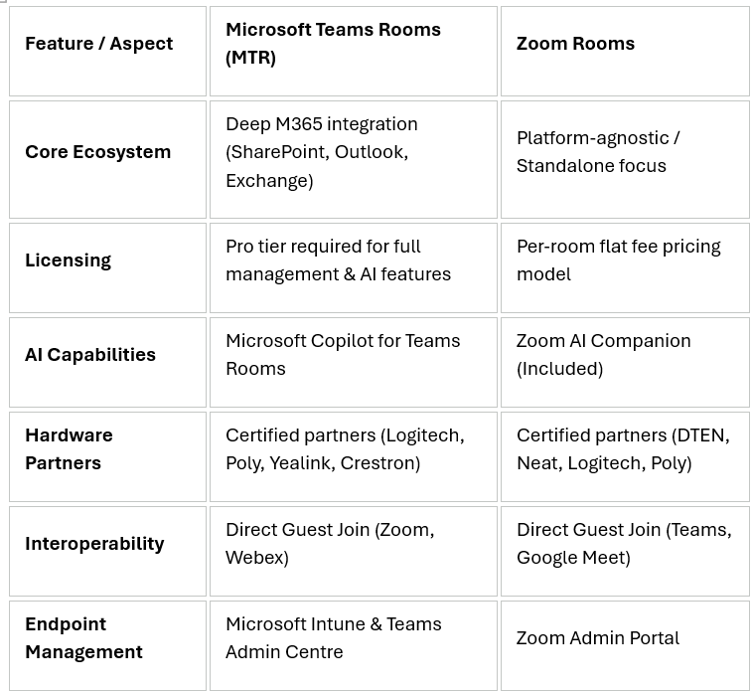
At a glance: feature comparison MTR vs Zoom
Verdict: Which Should You Choose?
Choose Microsoft Teams Rooms if:
Your organisation is already heavily invested in Microsoft 365, Exchange, and Intune endpoint management.
You want meeting recordings, transcripts, and whiteboards tied directly to existing Teams channels.
Most of your meeting traffic is internal, with occasional external calls.
Choose Zoom Rooms if:
You run a heterogeneous tech environment (e.g. Google Workspace combined with third-party tools).
You host high volumes of external client calls, webinars, or large-scale virtual town halls.
You want all-in-one AI meeting features included in the baseline license cost.
Frequently Asked Questions
Can I run Zoom meetings on Microsoft Teams Rooms hardware?
Yes. Through Direct Guest Join, Microsoft Teams Rooms can join Zoom meetings with a single touch from the room controller, without needing to change hardware or reboot systems.
Do I need a separate license for meeting room hardware?
Yes. Both systems require room-specific licensing rather than standard user licenses. Microsoft offers Teams Rooms Basic (limited features for up to 25 rooms) and Teams Rooms Pro, whilst Zoom provides a dedicated Zoom Rooms license per device.
Can existing hardware be converted from Zoom Rooms to Teams Rooms?
In many cases, yes. Certified hardware appliances from vendors such as Logitech, Neat, Poly, and Yealink often support dual-booting or switching provider modes via system settings, allowing IT teams to reconfigure equipment without buying new kit.
Which platform handles guest access and external callers better?
Zoom Rooms generally provides a smoother experience for external guests, as participants do not need an enterprise account or tenant configuration to join. Teams Rooms works seamlessly internally, but external access depends on your organization's guest access policies in Microsoft 365.
How do Microsoft Teams Rooms and Zoom Rooms handle room scheduling panels?
Both platforms support dedicated scheduling displays outside meeting rooms. Zoom Rooms includes scheduling display capabilities within its standard room license. Microsoft Teams Rooms requires a Teams Rooms Pro license for each scheduling panel to enable full door-display functionality.
What happens if our internet connection drops during a meeting?
If local internet connectivity drops, both platforms lose cloud video stream capabilities. However, local hardware passthrough (BYOD mode) or direct HDMI ingest allows local presentation content to remain on display screens even when cloud connectivity is unavailable.
Which system offers stronger enterprise security and compliance controls?
Microsoft Teams Rooms integrates directly with Microsoft Entra ID (formerly Azure AD), Conditional Access, Microsoft Purview, and Intune, making it easier to enforce corporate compliance rules. Zoom Rooms offers robust native security controls (SOC 2, ISO 27001, end-to-end encryption) and integrates with major identity providers (Okta, Ping, Azure AD).